A fireworks show set to music is called a pyromusical. The best ones feel inevitable: every burst seems to be caused by the music. That feeling comes from a few habits that professional designers share. This guide walks through them in the order you would use them.
1. Choose and cut the music
Pick music with clear changes in energy: a quiet opening, a build, a contrast, a climax. A track that is loud from start to end leaves you nowhere to go. Many displays combine several pieces into one soundtrack; if you do, cut on the beat and keep transitions short, because the sky goes dark during an awkward crossfade.
Length is a budget question. Each second of a dense finale can use several shells, while a slow passage might fire one shell every few seconds. Decide the length after you know roughly how many shells you can afford.
2. Map the structure before placing a single shell
Listen through and mark the sections: intro, verses, choruses, bridge, drops, ending. Note the moments that need an answer in the sky: a drum hit, a key change, a held note, a sudden silence. Those markers are the skeleton of the show; everything else fills in around them.
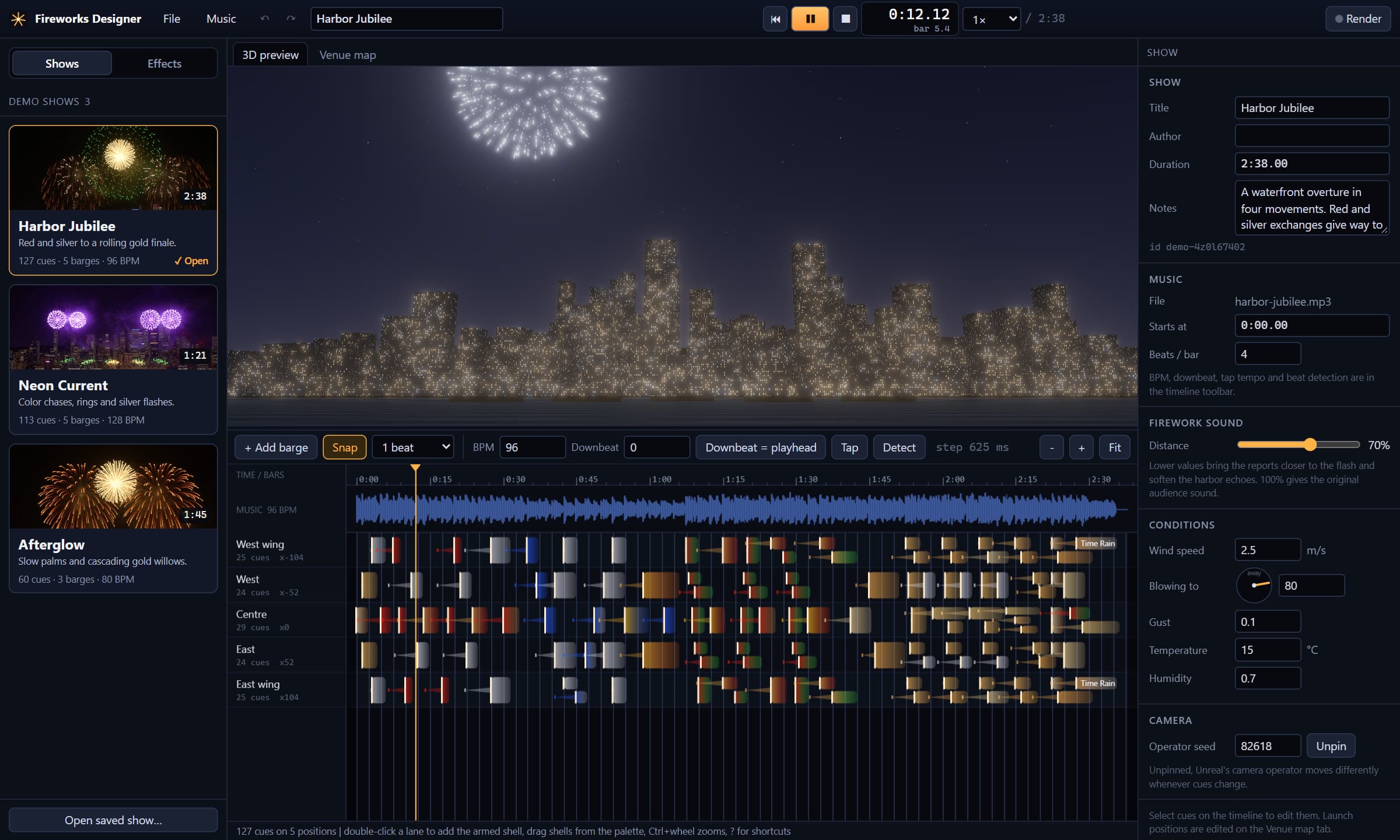
In PyroViz the waveform sits above the barge lanes, so the loud and quiet sections are visible while you design. Set the tempo first (detect it, or tap it with T) and line the downbeat up with the first strong beat. With the grid in place, every shell you drop snaps to the music.
3. Time the break, not the launch
The most common beginner mistake is to fire on the beat. A shell takes seconds to climb: about 3.4 seconds for a 3-inch shell, 4.6 for a 6-inch and around 6 for a 12-inch. If you launch on the beat, the burst lands well after it.
Designers think in break times: the moment the shell bursts. The launch time is the break time minus the lift time, and a firing system or script fires the mortar that much earlier. PyroViz places each cue at its break and computes the launch from the shell, so if you swap a 3-inch for an 8-inch, the launch moves earlier on its own and the burst stays on the beat.
Tip: effects without a climb, like mines and comets, respond instantly. They are ideal for sharp accents that must land exactly on a hit.
4. Use three layers of height
A full sky has depth. Think in three layers:
- Low (ground to ~100 m): mines, comets, small shells. Fast, punchy, good for rhythm.
- Middle (~100–200 m): 3- to 6-inch shells. The workhorses: colour peonies, chrysanthemums, crossettes.
- High (200 m and up): 8- to 12-inch shells. Big statements: kamuro, willows, pistils.
Combining layers on one beat makes a chord: a low mine for the attack, a mid peony for colour and a high willow that sustains. See how high each size goes in the shell size guide.
5. Give each section a palette
Colour is the easiest way to show the structure of the music. Give each section its own palette (red and silver for an opening, blues and whites for a calm verse, everything gold for the finale) and change it when the music changes. Too many colours at once turn into mud on camera; two or three per moment read clearly.
Texture matters as much as colour. Dots (peonies), lines (chrysanthemums), hanging trails (willows) and flashes (strobes) feel different even in the same colour.
6. Control density, and use silence
Plot the number of shells per second against the music and it should look like the music's energy. Build it up gradually, drop it back after a peak, and let the sky go dark when the music breathes. A moment of darkness before a big hit makes the hit far stronger than a continuous barrage.
Use the barges as an instrument too. A left-to-right chase across five barges on a run of eighth notes reads as movement; symmetrical pairs from the outer barges frame the centre; everything at once is a fortissimo.
7. Build the finale
The finale is the densest passage and the one people remember. Common patterns: a rising chase that fills every barge, a wall of gold kamuro or brocade crowns high in the sky, mines and comets underneath, and a handful of salutes to close. Keep something in reserve: a short dark gap followed by one last large shell on the final chord is a classic ending.
8. Check it like the audience
- Watch from the audience camera, not from above. Patterns and rings only read when they face the crowd.
- Mind the sound. Reports arrive about 0.3 seconds later per 100 m of distance. Salutes on a drum hit will sound late to the audience. Why the bang arrives late.
- Mind the smoke and wind. Smoke from a dense passage can hide the next one on a still night. Space big passages out, or move them upwind.
- Check the venue. The largest shell on each barge sets its safety distance. See the 70 feet per inch rule.
When it plays well in the preview, render it like footage and watch it as a film. If it still gives you goose bumps with lit smoke, reflections and late-arriving thunder, it is ready to show.